
“TIMELINES ARE THE DIVERGENT POINTS”
Let’s assume you did a point in time recovery after a wrong transaction, PostgreSQL branches to a new timeline and continue with the operations.
But what happens after you perform a point in time recovery, realized you made a mistake again?
That’s where recovery_target_timeline comes into picture.
In this post we are going to understand everything about recovery_target_timeline and timelines in PostgreSQL in general.
Table of Contents
PostgreSQL Timeline
Everytime you do a transaction in PostgreSQL the information is recorded in a wal file under $DATADIR/wal location.
The first file that is created is
000000010000000000000001
and when it is filled the next wal will be created with the name 000000010000000000000002 and so on.(It is a HEX notation and more information is beyond the scope of this post)
Here, the first eight digits represent PostgreSQL timeline.
In our example, the database cluster is in timeline 1.
After every point in time recovery, the timeline id will be increased by 1 and a new file called NewTimelineID.history is created.
recovery_target_timeline is a parameter which helps us to take our cluster to any timeline in the history provided a valid base backup and all the archivelogs in place.
Lets consider below example.,
I have initialized and started a new cluster with the below command
-bash-4.1$ initdb -D basebackup1
-bash-4.1$ pg_ctl start -D /u02/basebackup1
Then I created a table and inserted a record into it
postgres=# create table timeline(tid int, remarks varchar(1000));
CREATE TABLE
postgres=# insert into timeline values('1','This is timeline id 1');
INSERT 0 1
postgres=# checkpoint;
CHECKPOINT
postgres=# select pg_switch_wal();
pg_switch_wal
---------------
0/15D4B70
(1 row)
My record is somewhere in my wal 000000010000000000000001
After few switches, I have taken a full backup when my wal at 000000010000000000000005
-bash-4.1$ ls -rlt
total 147460
-rw------- 1 postgres postgres 16777216 Nov 22 13:03 000000010000000000000001
-rw------- 1 postgres postgres 16777216 Nov 22 13:03 000000010000000000000002
-rw------- 1 postgres postgres 16777216 Nov 22 13:03 000000010000000000000003
-rw------- 1 postgres postgres 16777216 Nov 22 13:05 000000010000000000000004
-rw------- 1 postgres postgres 16777216 Nov 22 13:05 000000010000000000000005
-rw------- 1 postgres postgres      337 Nov 22 13:05 000000010000000000000005.00000028.backup
-rw------- 1 postgres postgres 16777216 Nov 22 13:06 000000010000000000000006
-rw------- 1 postgres postgres 16777216 Nov 22 13:06 000000010000000000000007
Then I made a few switches and when my wal is at 000000010000000000000008
I inserted a new record.
postgres=# insert into timeline values('1','This is timeline id 1 after basebackup');
INSERT 0 1
postgres=# checkpoint;
CHECKPOINT
-bash-4.1$ pg_waldump 000000010000000000000008 | grep INSERT
rmgr: Heap        len (rec/tot):     54/   214, tx:
487, lsn: 0/08000110, prev 0/080000D8, desc: INSERT off 2 flags 0x00,
blkref #0: rel 1663/13530/16384 blk 0 FPW
-bash-4.1$
Then I made few switches and my current archived wal location is something like this
-bash-4.1$ ls -rlt
total 311308
-rw------- 1  16777216 Nov 22 13:03 000000010000000000000001
-rw------- 1  16777216 Nov 22 13:03 000000010000000000000002
-rw------- 1  16777216 Nov 22 13:03 000000010000000000000003
-rw------- 1  16777216 Nov 22 13:05 000000010000000000000004
-rw------- 1  16777216 Nov 22 13:05 000000010000000000000005
-rw------- 1       337 Nov 22 13:05 000000010000000000000005.00000028.backup
-rw------- 1  16777216 Nov 22 13:06 000000010000000000000006
-rw------- 1  16777216 Nov 22 13:06 000000010000000000000007
-rw------- 1  16777216 Nov 22 13:07 000000010000000000000008
-rw------- 1  16777216 Nov 22 13:07 000000010000000000000009
-rw------- 1  16777216 Nov 22 13:09 00000001000000000000000A
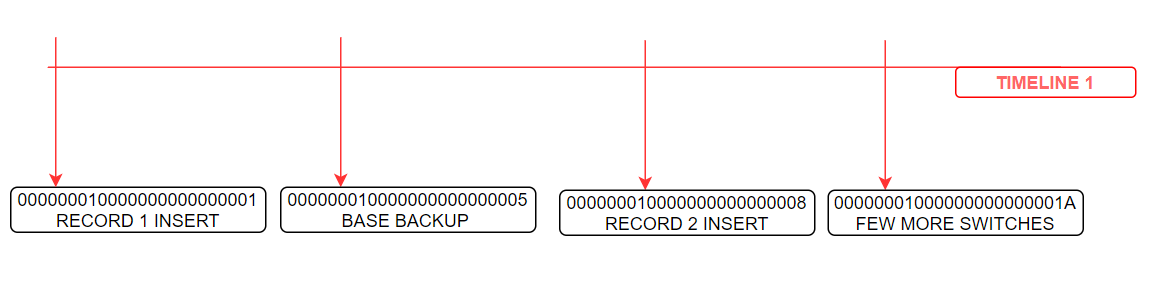
At this point of time, I have done a point in time recovery to some point in 000000010000000000000007 wal, before second insert.
so I gave recovery target lsn as ‘0/07000060’ in postgresql.conf file.
-bash-4.1$ cat postgresql.conf | grep lsn
recovery_target_lsn = '0/07000060'      # the WAL LSN up to which recovery will proceed
-bash-4.1$
After successful point in time recovery, the PostgreSQL branched to a new timeline.
At the end of recovery the following things will happen
- End of recovery means the point where the the database opens up for writing
- New timeline is chosen
- A timeline history file is written
- The partial last WAL file on the previous timeline is copied with the new timeline’s ID
- A checkpoint record is written on the new timeline
alert log says,
LOG:  starting point-in-time recovery to WAL location (LSN) "0/7000060"
LOG:  restored log file "000000010000000000000005" from archive
LOG:  redo starts at 0/5000028
LOG:  consistent recovery state reached at 0/5000138
LOG:  database system is ready to accept read only connections
LOG:  restored log file "000000010000000000000006" from archive
LOG:  restored log file "000000010000000000000007" from archive
LOG:  recovery stopping after WAL location (LSN) "0/7000060"
LOG:  pausing at the end of recovery
HINT:  Execute pg_wal_replay_resume() to promote.
after executing pg_wal_replay_resume(), the postgresql changed to timeline 2 and the same information is recorded in archivelog location.
-rw------- 1 postgres postgres 16777216 Nov 22 13:05 000000010000000000000005
-rw------- 1 postgres postgres      337 Nov 22 13:05 000000010000000000000005.00000028.backup
-rw------- 1 postgres postgres 16777216 Nov 22 13:06 000000010000000000000006
-rw------- 1 postgres postgres 16777216 Nov 22 13:06 000000010000000000000007
-rw------- 1 postgres postgres 16777216 Nov 22 13:07 000000010000000000000008
-rw------- 1 postgres postgres 16777216 Nov 22 13:07 000000010000000000000009
-rw------- 1 postgres postgres 16777216 Nov 22 13:09 00000001000000000000000A
-rw-r----- 1 postgres postgres       33 Nov 22 13:12 00000002.history
-rw-r----- 1 postgres postgres 16777216 Nov 22 13:13 000000020000000000000007
-rw------- 1 postgres postgres 16777216 Nov 22 13:13 000000020000000000000008
-rw------- 1 postgres postgres 16777216 Nov 22 13:14 000000020000000000000009
-rw-r----- 1 postgres postgres 16777216 Nov 22 13:15 00000002000000000000000A

-bash-4.1$
Here, the PostgreSQL has branched to a new timeline at walfile 7 and started creating new walfiles with timeline id 2.
The 00000002.history file confirms that the PostgreSQL has branched to new timeline.
The history file is a small text file that read
-bash-4.1$ cat 00000002.history
1 0/70000D8 after LSN 0/7000060
Here
1<parentTLI> 0/70000D8 <switchpoint> after LSN 0/7000060<reason>
parentTLI ID of the parent timeline
switchpoint XLogRecPtr of the WAL location where the switch happened
reason human-readable explanation of why the timeline was changed
Now, I inserted one record at 00000002000000000000000A (0/A000060)
postgres=# insert into timeline values('2','This is timeline id 2 correct');
INSERT 0 1
and another record at 00000002000000000000000D (0/D000000)
postgres=# insert into timeline values('2','This is timeline id 2 wrong at 0/D000000');
INSERT 0 1
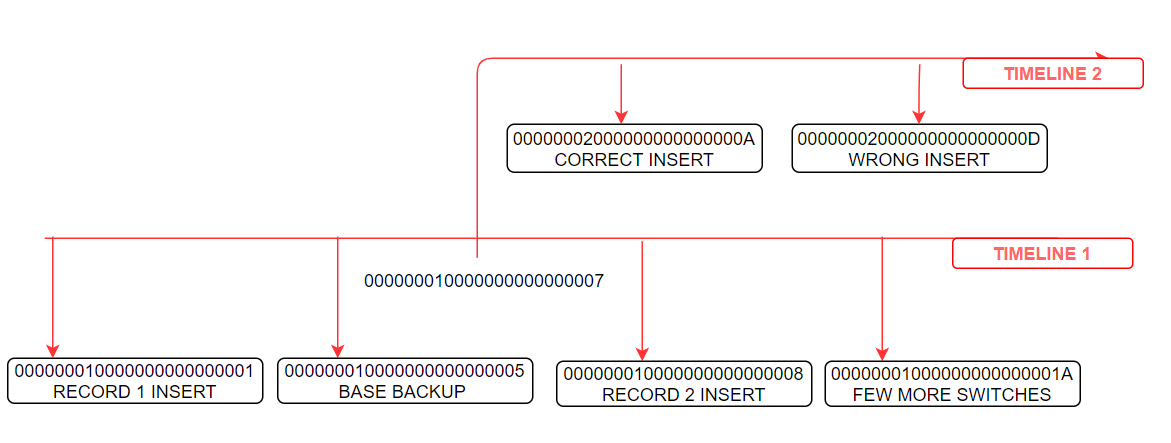
At this point of time I realized that I did a mistake at 00000002000000000000000D and has to rollback to 00000002000000000000000C of timeline 2.
This can be achieved by setting below parameters in postgresql.conf file
recovery_target_timeline = '2'
recovery_target_lsn = '0/0C000060'
After setting up above parameters, I started the cluster and the alert log says
LOG:  database system was interrupted; last known up at 2020-11-22 13:05:01 IST
LOG:  restored log file "<span style="color: rgb(255, 0, 0);" data-mce-style="color: #ff0000;">00000002.history</span>" from archive
cp: cannot stat `/u02/archivelogs/00000003.history': No such file or directory
LOG:  starting point-in-time recovery to WAL location (LSN) "0/C000060"
LOG:  restored log file "00000002.history" from archive
LOG:  restored log file "<span style="color: rgb(255, 0, 0);" data-mce-style="color: #ff0000;">000000010000000000000005</span>" from archive
LOG:  redo starts at 0/5000028
LOG:  consistent recovery state reached at 0/5000138
LOG:  database system is ready to accept read only connections
LOG:  restored log file "000000010000000000000006" from archive
LOG:  restored log file "000000020000000000000007" from archive
LOG:  restored log file "000000020000000000000008" from archive
LOG:  restored log file "000000020000000000000009" from archive
LOG:  restored log file "00000002000000000000000A" from archive
LOG:  restored log file "00000002000000000000000B" from archive
LOG:  restored log file "<span style="color: rgb(255, 0, 0);" data-mce-style="color: #ff0000;">00000002000000000000000C</span>" from archive
LOG:  recovery stopping after WAL location (LSN) "<span style="color: rgb(255, 0, 0);" data-mce-style="color: #ff0000;">0/C000060</span>"
LOG:  pausing at the end of recovery
HINT:  Execute pg_wal_replay_resume() to promote.
..
LOG:  redo done at 0/C000060
LOG:  last completed transaction was at log time 2020-11-22 13:15:29.696929+05:30
LOG:  selected new timeline ID: 3
When I selected the table,
postgres=# select * from timeline;
 tid |            remarks
-----+-------------------------------
   1 | This is timeline id 1
   2 | This is timeline id 2 correct
(2 rows)
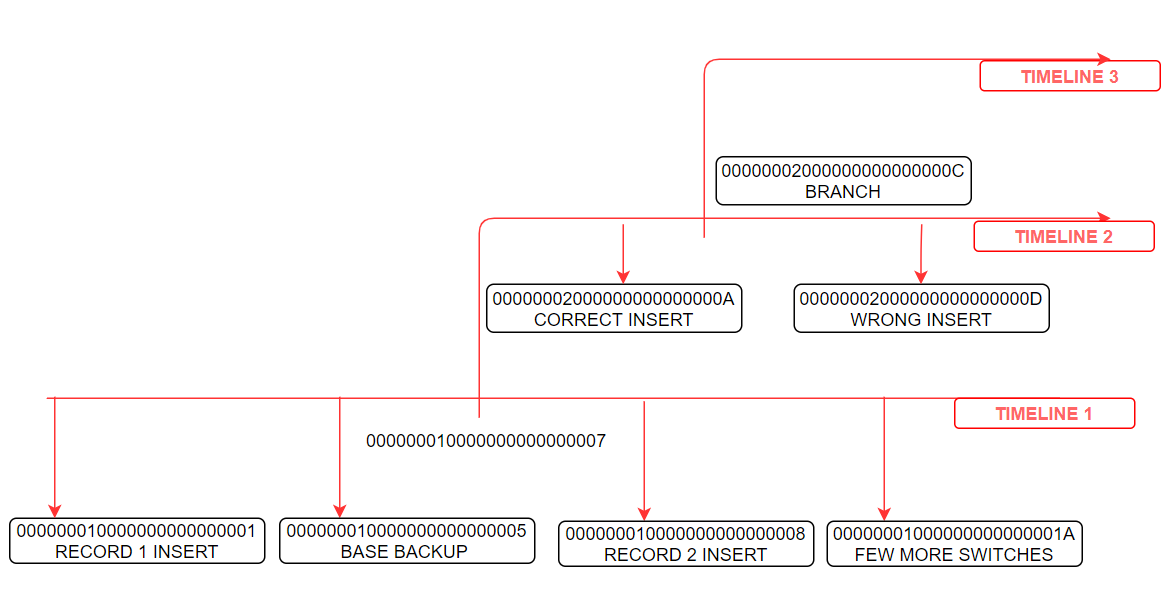
The history file will is recorded with below details
-bash-4.1$ cat 00000003.history
1       0/70000D8       after LSN 0/7000060


2       0/C0000D8       after LSN 0/C000060
Here
timeline 1 branched at 0/70000D8
timeline 2 branched at 0/C0000D8
and current timeline is going to be 3.
-rw-r----- 1 postgres postgres 16777216 Nov 22 13:16 00000002000000000000000F
-rw-r----- 1 postgres postgres       67 Nov 22 15:59 00000003.history
-rw-r----- 1 postgres postgres 16777216 Nov 22 16:05 00000003000000000000000C
Active data guard in PostgreSQL:
Let us consider there is an active streaming replication in place (streaming replication configuration is not the part of this post)

The left hand side demonstrates primary and right hand side indicates that standby is in sync with primary.
During the cutover, the wal files diverged at wal file 16
-bash-4.1$ cd /u02/pgsql/16/pg_wal
-bash-4.1$ ls -lrt
total 163848
-rw------- 1 postgres postgres 16777216 Nov 27 14:35 00000002000000000000001B
-rw------- 1 postgres postgres 16777216 Nov 27 14:39 00000002000000000000001E
-rw------- 1 postgres postgres 16777216 Nov 27 14:40 000000010000000000000016.partial
-rw------- 1 postgres postgres       42 Nov 27 14:40 00000002.history
-rw------- 1 postgres postgres 16777216 Nov 27 14:42 00000002000000000000001C
-rw------- 1 postgres postgres 16777216 Nov 27 14:42 000000020000000000000016
Here, from 16 onwards, both primary and standby started creating its own wal files.
I inserted few records in same table in both machines and have done few log switches.
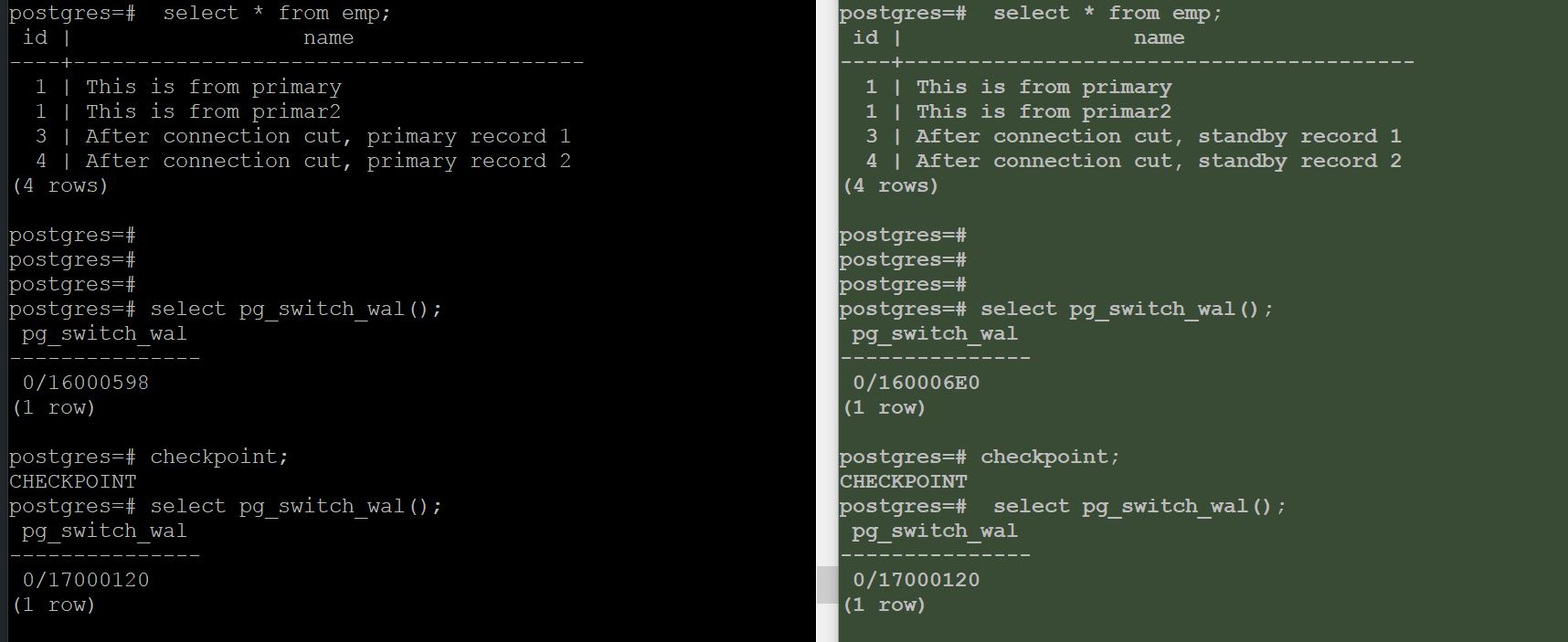
Here, which indicates that I used my standby as an active data guard.
At this point of time, I have done with my testing, now I wanted to make my secondary machine as a standby for primary again.
How can I do that ?
Using divergent timeline, just rewind the standby cluster and set up replication again(create recovery.conf file).
- Stop standby cluster.
- use pg_rewind to revert the changes made after divergent.
pg_rewind –target-pgdata=/u02/pgsql/16 –source-server=”port=5432 user=postgres host=192.168.1.128″
-bash-4.1$ pg_rewind  --target-pgdata=/u02/pgsql/16  --source-server="port=5432 user=postgres host=192.168.1.128"
servers diverged at WAL location 0/16000310 on timeline 1
rewinding from last common checkpoint at 0/16000268 on timeline 1
Done!
- Create a recovery.conf file and place it in standby machine
standby_mode='on'
primary_conninfo = 'user=postgres password=postgres host=192.168.1.128 port=5432 sslmode=disable sslcompression=1'
restore_command='cp /u02/archivelogs/%f %p'
trigger_file='/tmp/postgresql.trigger.5432'
- start the standby cluster
pg_ctl start -D /u02/pgsql/16
alert log says,
2020-11-27 14:54:16 IST [15113]: [2-1] user=,db=,app=,client= HINT:  If this has occurred more than once some data might be corrupted and you might need to choose an earlier recovery target.
2020-11-27 14:54:16 IST [15113]: [3-1] user=,db=,app=,client= LOG:  entering standby mode
2020-11-27 14:54:16 IST [15113]: [4-1] user=,db=,app=,client= LOG:  restored log file "000000010000000000000016" from archive
2020-11-27 14:54:16 IST [15113]: [5-1] user=,db=,app=,client= LOG:  redo starts at 0/16000230
2020-11-27 14:54:16 IST [15113]: [6-1] user=,db=,app=,client= LOG:  restored log file "000000010000000000000017" from archive
2020-11-27 14:54:16 IST [15113]: [7-1] user=,db=,app=,client= LOG:  restored log file "000000010000000000000018" from archive
2020-11-27 14:54:16 IST [15113]: [8-1] user=,db=,app=,client= LOG:  restored log file "000000010000000000000019" from archive
cp: cannot stat `/u02/archivelogs/00000001000000000000001A': No such file or directory
2020-11-27 14:54:16 IST [15121]: [1-1] user=,db=,app=,client= LOG:  started streaming WAL from primary at 0/1A000000 on timeline 1
2020-11-27 14:54:16 IST [15113]: [9-1] user=,db=,app=,client= LOG:  consistent recovery state reached at 0/1A02E548
2020-11-27 14:54:16 IST [15111]: [6-1] user=,db=,app=,client= LOG:  database system is ready to accept read only connections
- Check if the recovery is getting continued from where it was stopped during divergent.
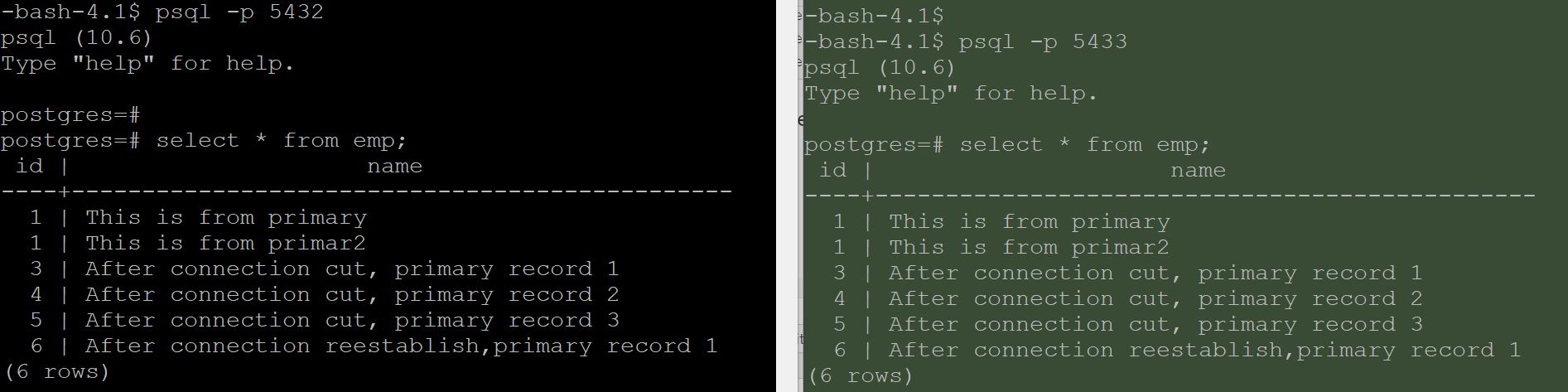
Records inserted after divergent are gone and my standby has started receiving data from primary.
How to resolve requested starting point XX on timeline x is not in this server’s history?
Let us conclude the timeline discussion with a final simulation.
From above output, it is confirmed that my standby started receiving data.
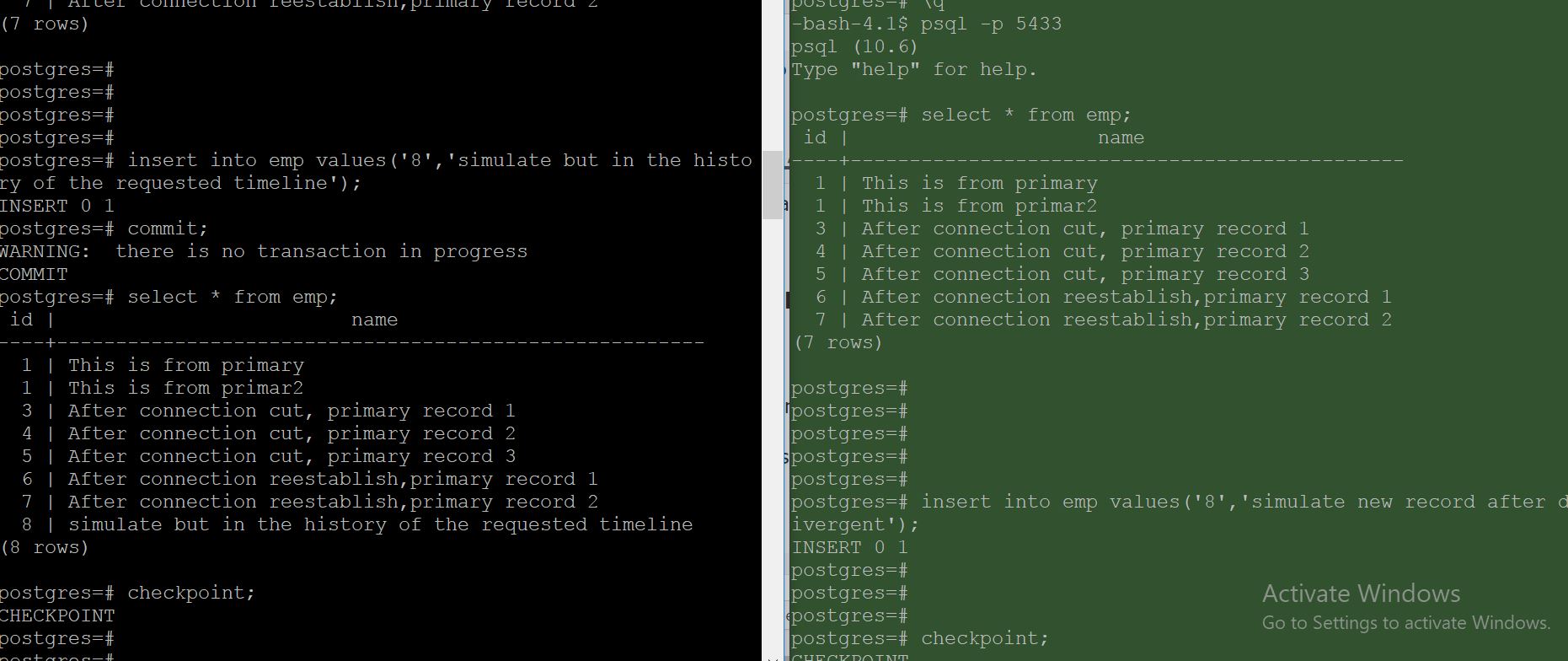
Here, I made divergence again and inserted a record
8 | simulate but in the history of the requested timeline
in old primary, at the same time inserted a record
‘8’,’simulate new record after divergent’
in new primary.
Ensured that both had different checkpoints after divergence.
Now when I tried to make old primary as standby to current primary by adding a recovery.conf file, I got below error when starting the cluster.
FATAL: could not start WAL streaming: ERROR: requested starting point 0/1D000000 on timeline 2 is not in this server’s history
DETAIL: This server’s history forked from timeline 2 at 0/1C0004C8.
The error is because, after divergence when I tried to make old primary as standby I need to ensure that all the changes made in old primary has to be reverted.
this can be achived with pg_rewind.
so I did pg_rewind and started my old primary cluster.
pg_rewind –target-pgdata=/u02/pgsql/15 –source-server=”port=5433 user=postgres host=192.168.1.128″
-bash-4.1$ pg_rewind --target-pgdata=/u02/pgsql/16 --source-server="port=5432 user=postgres host=192.168.1.128"
servers diverged at WAL location 0/1C0004C8 on timeline 2
rewinding from last common checkpoint at 0/1C000420 on timeline 2


-bash-4.1$ pg_ctl start -D /u02/pgsql/16
The database started with alert log
LOG:  entering standby mode
LOG:  restored log file "00000003.history" from archive
LOG:  restored log file "00000002.history" from archive
LOG:  redo starts at 0/1C0003E8
LOG:  invalid record length at 0/1C01C2D0: wanted 24, got 0
LOG:  started streaming WAL from primary at 0/1C000000 on timeline 3
LOG:  consistent recovery state reached at 0/1C01C308
LOG:  database system is ready to accept read only connections
Words from postgreshelp
Thank you for giving your valuable time to read the above information. I hope the content served your purpose in reaching out the blog.
Suggestions for improvement of the blog are highly appreciable. Please contact us for any information/suggestion/feedback.
If you want to be updated with all our articles
please follow us on Facebook | Twitter
Please subscribe to our newsletter.