
Table of Contents
How to install PostgreSQL 13 in UBUNTU From Repository
PostgreSQL can be installed by means of two ways
- Installing from source
- Installing binary packages
Each method has its own advantages and disadvantages, however, we will limit this post to learn how to install PostgreSQL using binaries packages.
Follow the steps here to get the automated scripts to install PostgreSQL 13 in RHEL 7.
Install PostgreSQL 13 – UBUNTU 16.04[step by step]:
I assume that all the prerequisites for installing PostgreSQL have met, I highly recommend to follow this link to learn more about prerequisites.
Check the version of ubuntu
root@devops-git:~# lsb_release -a
No LSB modules are available.
Distributor ID: Ubuntu
Description:    Ubuntu 16.04.6 LTS
Release:        16.04
Codename:       xenial
Open the following link to select Linux version.
After selecting the ubuntu options, I got the following options.
# Create the file repository configuration:
sudo sh -c 'echo "deb http://apt.postgresql.org/pub/repos/apt $(lsb_release -cs)-pgdg main" > /etc/apt/sources.list.d/pgdg.list'

# Import the repository signing key:
wget --quiet -O - https://www.postgresql.org/media/keys/ACCC4CF8.asc | sudo apt-key add -

# Update the package lists:
sudo apt-get update

# Install the latest version of PostgreSQL.
# If you want a specific version, use 'postgresql-12' or similar instead of 'postgresql':
sudo apt-get -y install postgresql
Sample output after executing the above commands
root@devops-git:~# sh -c 'echo "deb http://apt.postgresql.org/pub/repos/apt $(lsb_release -cs)-pgdg main" > /etc/apt/sources.list.d/pgdg.list'
root@devops-git:~# wget --quiet -O - https://www.postgresql.org/media/keys/ACCC4CF8.asc | sudo apt-key add -
OK
root@devops-git:~# sudo apt-get update
Hit:1 http://asia-southeast1.gce.archive.ubuntu.com/ubuntu xenial InRelease
Hit:2 http://asia-southeast1.gce.archive.ubuntu.com/ubuntu xenial-updates InRelease
Hit:3 http://asia-southeast1.gce.archive.ubuntu.com/ubuntu xenial-backports InRelease
Hit:4 http://security.ubuntu.com/ubuntu xenial-security InRelease
Hit:5 http://archive.canonical.com/ubuntu xenial InRelease
Hit:6 http://apt.postgresql.org/pub/repos/apt xenial-pgdg InRelease
Reading package lists... Done
root@devops-git:~#
The following command will install PostgreSQL 13 on UBUNTU 16
apt-get -y install postgresql
root@devops-git:~# apt-get -y install postgresql
Reading package lists... Done
..
..

Creating config file /etc/postgresql-common/createcluster.conf with new version
Building PostgreSQL dictionaries from installed myspell/hunspell packages...
Removing obsolete dictionary files:
Setting up postgresql-13 (13.1-1.pgdg16.04+1) ...
Creating new PostgreSQL cluster 13/main ...
/usr/lib/postgresql/13/bin/initdb -D /var/lib/postgresql/13/main --auth-local peer --auth-host md5
The files belonging to this database system will be owned by user "postgres".
This user must also own the server process.

The database cluster will be initialized with locale "en_US.UTF-8".
The default database encoding has accordingly been set to "UTF8".
The default text search configuration will be set to "english".

Data page checksums are disabled.

fixing permissions on existing directory /var/lib/postgresql/13/main ... ok
creating subdirectories ... ok
selecting dynamic shared memory implementation ... posix

...
...
Success. You can now start the database server using:

    pg_ctlcluster 13 main start

Ver Cluster Port Status Owner    Data directory              Log file
13  main    5432 down   postgres /var/lib/postgresql/13/main /var/log/postgresql/postgresql-13-main.log
update-alternatives: using /usr/share/postgresql/13/man/man1/postmaster.1.gz to provide /usr/share/man/man1/postmaster.1.gz (postmaster.1.gz) in auto mode

Setting up postgresql (13+223.pgdg16.04+1) ...
To start the cluster run the below command
pg_ctlcluster 13 main start
root@devops-git:~# pg_ctlcluster 13 main start
root@devops-git:~#
root@devops-git:~#
root@devops-git:~#
root@devops-git:~#
root@devops-git:~# ps -ef | grep postgres
postgres  6360     1  0 14:23 ?        00:00:00 /usr/lib/postgresql/13/bin/postgres -D /var/lib/postgresql/13/main -c config_file=/etc/postgresql/13/main/postgresql.conf
postgres  6362  6360  0 14:23 ?        00:00:00 postgres: 13/main: checkpointer
postgres  6363  6360  0 14:23 ?        00:00:00 postgres: 13/main: background writer
postgres  6364  6360  0 14:23 ?        00:00:00 postgres: 13/main: walwriter
postgres  6365  6360  0 14:23 ?        00:00:00 postgres: 13/main: autovacuum launcher
postgres  6366  6360  0 14:23 ?        00:00:00 postgres: 13/main: stats collector
postgres  6367  6360  0 14:23 ?        00:00:00 postgres: 13/main: logical replication launcher
root      6487  2624  0 14:26 pts/1    00:00:00 grep --color=auto postgres
root@devops-git:~#
From the above output, we can confirm that pg_ctlcluster is initdb equivalent in ubuntu.
During installation, PostgreSQL first creates a common configuration file at
/etc/postgresql-common/createcluster.conf
While initializing a new cluster, PostgreSQL takes the data directory location from the above configuraton file.
How to initialize PostgreSQL 13 database cluster in a non default location
- Stop PostgreSQL 13 database cluster if it is already running
root@devops-git:~# service postgresql stop
- Modify the data directory location in common configuration file
root@devops-git:~# cat /etc/postgresql-common/createcluster.conf | grep data
# Default data directory.
data_directory = '/u01/pgsql/13'
# Unset by default, i.e. transaction logs remain in the data directory.
root@devops-git:~#
- Create required directories
mkdir -p /u01/pgsql/13
chown -R postgres:postgres /u01/pgsql/13
- Initialize the new cluster with pg_ctlcluster command
pg_createcluster –start 13 custom
Sample output
root@devops-git:~# pg_createcluster --start 13 custom
Creating new PostgreSQL cluster 13/custom ...
/usr/lib/postgresql/13/bin/initdb -D /u01/pgsql/13 --auth-local peer --auth-host md5
The files belonging to this database system will be owned by user "postgres".
This user must also own the server process.

The database cluster will be initialized with locale "en_US.UTF-8".
The default database encoding has accordingly been set to "UTF8".
The default text search configuration will be set to "english".

Data page checksums are disabled.

fixing permissions on existing directory /u01/pgsql/13 ... ok
creating subdirectories ... ok
selecting dynamic shared memory implementation ... posix
selecting default max_connections ... 100
selecting default shared_buffers ... 128MB
selecting default time zone ... Etc/UTC
creating configuration files ... ok
running bootstrap script ... ok
performing post-bootstrap initialization ... ok
syncing data to disk ... ok

Success. You can now start the database server using:

    pg_ctlcluster 13 custom start

Ver Cluster Port Status Owner    Data directory Log file
13  custom  5433 online postgres /u01/pgsql/13  /var/log/postgresql/postgresql-13-custom.log
- Start the cluster
pg_ctlcluster 13 custom start
root@devops-git:~# pg_ctlcluster 13 custom start
root@devops-git:~#
root@devops-git:~#
root@devops-git:~#
root@devops-git:~# ps -ef | grep postgres
postgres  6697     1  0 14:33 ?        00:00:00 /usr/lib/postgresql/13/bin/postgres -D /u01/pgsql/13 -c config_file=/etc/postgresql/13/custom/postgresql.conf
postgres  6699  6697  0 14:33 ?        00:00:00 postgres: 13/custom: checkpointer
postgres  6700  6697  0 14:33 ?        00:00:00 postgres: 13/custom: background writer
postgres  6701  6697  0 14:33 ?        00:00:00 postgres: 13/custom: walwriter
postgres  6702  6697  0 14:33 ?        00:00:00 postgres: 13/custom: autovacuum launcher
postgres  6703  6697  0 14:33 ?        00:00:00 postgres: 13/custom: stats collector
postgres  6704  6697  0 14:33 ?        00:00:00 postgres: 13/custom: logical replication launcher
root      6734  2624  0 14:34 pts/1    00:00:00 grep --color=auto postgres
root@devops-git:~#
The above process creates a new instance called custom, we can find that from below tool
root@devops-git:~# pg_lsclusters
Ver Cluster Port Status Owner    Data directory              Log file
13  custom  5433 online postgres /u01/pgsql/13               /var/log/postgresql/postgresql-13-custom.log
13  main    5432 online postgres /var/lib/postgresql/13/main /var/log/postgresql/postgresql-13-main.log
root@devops-git:~#
root@devops-git:~#
Now stop previous cluster created by default with
systemctl stop postgresql@13-main
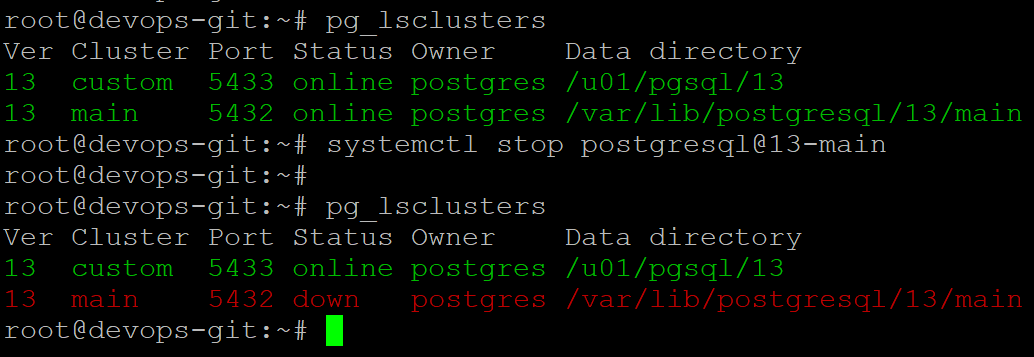
Now check the status of postgresql service

Words from postgreshelp
Thank you for giving your valuable time to read the above information. I hope the content served your purpose in reaching out the blog.
Suggestions for improvement of the blog are highly appreciable. Please contact us for any information/suggestion/feedback.
If you want to be updated with all our articles
please follow us on Facebook | Twitter
Please subscribe to our newsletter.