
Table of Contents
Short description of the components used
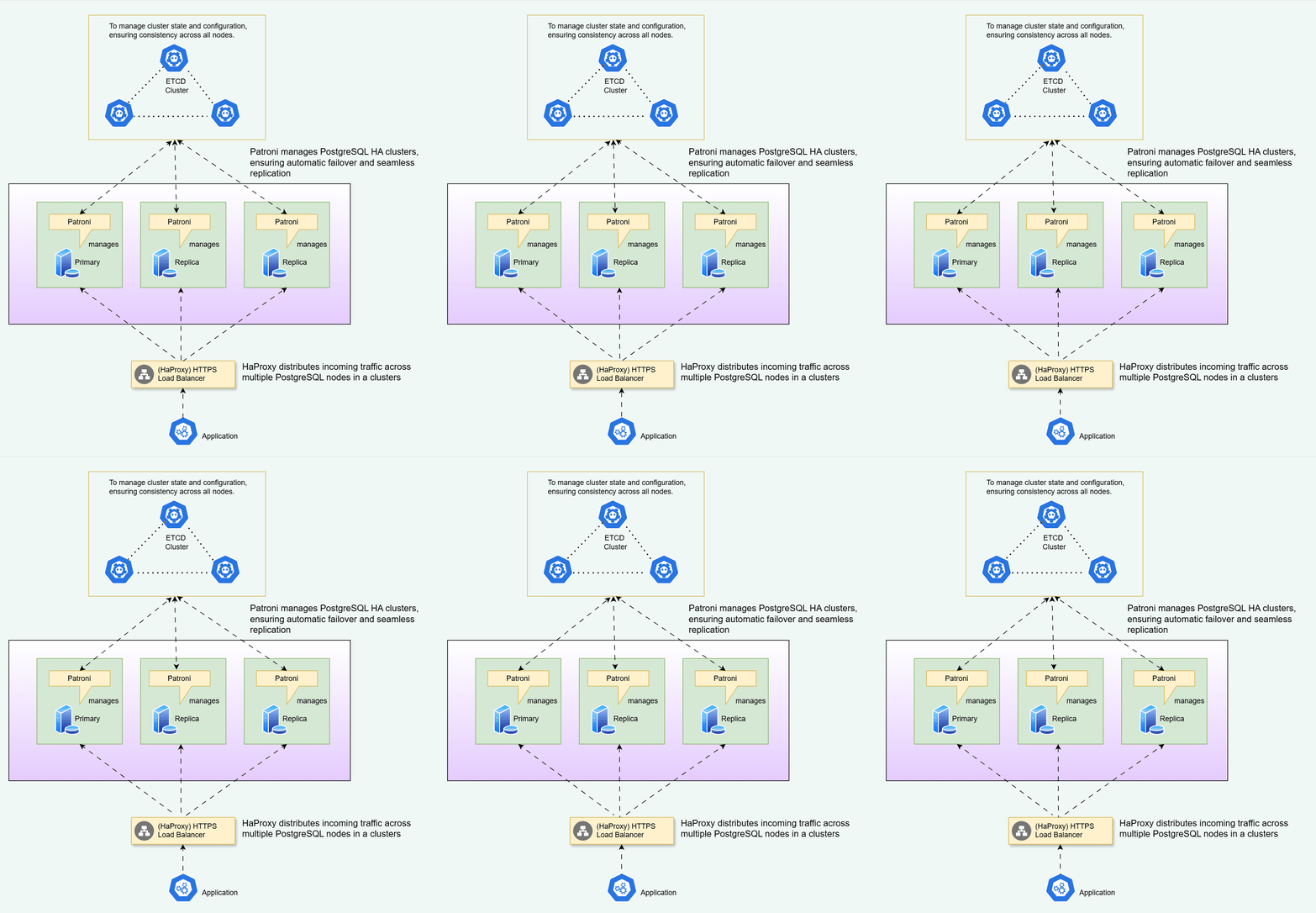
Patroni:
Patroni is an open-source tool used to manage PostgreSQL HA clusters. It’s a lightweight solution that uses the PostgreSQL replication mechanism to ensure that all nodes in the cluster have an up-to-date copy of the database. Patroni provides automatic failover and ensures that only one node is active at any given time.
HAProxy:
HAProxy is a load balancer that can be used to distribute incoming traffic across multiple PostgreSQL nodes in a cluster. It acts as a proxy between clients and the active node in the cluster and ensures that requests are routed to the appropriate node. HAProxy can also detect when a node becomes unavailable and automatically switch to a different node in the cluster.
Keepalived:
Keepalived is a Linux-based software that provides high availability for Linux systems. It can be used to monitor the health of the PostgreSQL nodes and automatically switch the virtual IP address to a healthy node in case of a failure. This ensures that client connections are redirected to the active node in the cluster.
etcd:
etcd is a distributed key-value store used to store configuration data for the PostgreSQL HA cluster. It’s used by Patroni to manage the state of the cluster, and by HAProxy and Keepalived to determine which node is currently active. etcd ensures that the configuration data is consistent across all nodes in the cluster.
Watchdog:
The watchdog process is responsible for monitoring the health of the PostgreSQL node and its associated processes. The watchdog process ensures that the PostgreSQL node is running correctly and that it’s able to serve client requests. If the watchdog detects an issue with the node or its processes, it can take action to recover the node or initiate failover to a standby node.
System Requirements
To follow this tutorial along, you will need a minimum of 3 virtual machines installed with CentOS 9. The purpose is defined is below
| Hostname | IPAddress | Purpose |
| lab01 | 192.168.88.128 | etcd, HAProxy, keepalived, Patroni and PostgreSQL, pgBouncer |
| lab02 | 192.168.88.129 | etcd, HAProxy, keepalived, Patroni and PostgreSQL, pgBouncer |
| lab03 | 192.168.88.130 | etcd, HAProxy, keepalived, Patroni and PostgreSQL, pgBouncer |
| ha-vip | 192.168.88.140 | HA-VIP |
In this lab setup,
- I will use the words lab01, lab02, etc., to refer to machines 1, 2, and so on. For example., executing “the command in lab01″ means executing the command in “192.168.88.128” as mentioned in the table above.
- If I mention [all machines] indicate that commands have to be executed in all machines.
- If I mention [… accordingly] it means you need to make necessary changes as mentioned in the color red in each of the machines.
Pre-requisites
Create postgres user [all machines]
useradd postgres
passwd postgres
Add the user to the /etc/sudoers file
## Allow root to run any commands anywhere
root ALL=(ALL) ALL
postgres ALL=(ALL) NOPASSWD:ALL
Set the hostname [all machines accordingly]
sudo hostnamectl set-hostname lab01
reboot
You should see something like this
[root@lab01 ~]#
For Machine 2, it should be
sudo hostnamectl set-hostname lab02
reboot
and repeat for lab03
Get IP Addresses of all machines and edit /etc/hosts file: [all machines]
vi /etc/hosts
add the below lines
192.168.88.128 lab01
192.168.88.129 lab02
192.168.88.130 lab03
192.168.88.140 ha-vip
Here 192.168.88.140 can be any IP that is not being used and is in the network, I choose 192.168.88.140 randomly. we use this IP address in keepalived configuration below.
Disable Selinux [all machines]
Log in to lab01 and edit /etc/selinux/config file with any of your favorite text editor:
vi /etc/selinux/config
Change SELINUX=enforcing to SELINUX=disabled
SELINUX=disabled
Reboot to make the selinux changes effect:
reboot
Configure Firewalld
To set up Patroni for PostgreSQL with additional components like HAProxy, etcd, Keepalived, Pgbouncer, and web servers the following ports need to be opened:
- Patroni:
- 8008: This port is used for the HTTP API of Patroni.
- HAProxy:
- 5000: This port is used for HTTP connections to the backend (PostgreSQL service).
- 5001: This port is used for HTTPS connections to the backend (PostgreSQL service).
- etcd:
- 2379: This port is used for etcd client communication.
- 2380: This port is used for etcd server-to-server communication.
- Keepalived:
- 112: This port is used for the Virtual Router Redundancy Protocol (VRRP) communication between Keepalived instances.
- 5405: This port is used for the multicast traffic between Keepalived instances.
- Pgbouncer:
- 6432: This port is used for Pgbouncer client connections.
- PostgreSQL:
- 5432: This port is used for PostgreSQL client connections.
- Web server:
- 5000: This port is used for HTTP connections to the web server.
- 5001: This port is used for HTTPS connections to the web server.
- 7000: This port is used for the reverse proxy connection from the web server to HAProxy.
These ports are required to allow communication between the different components of the setup. However, the specific port configuration can vary depending on your specific setup and requirements. It’s important to adjust firewall rules and network configurations accordingly to ensure the proper functioning and security of the setup.
//End-to-End PostgreSQL Administration Training: Click here
Run the below commands to open above ports [all machines]
firewall-cmd --zone=public --add-port=5432/tcp --permanent
firewall-cmd --zone=public --add-port=6432/tcp --permanent
firewall-cmd --zone=public --add-port=8008/tcp --permanent
firewall-cmd --zone=public --add-port=2379/tcp --permanent
firewall-cmd --zone=public --add-port=2380/tcp --permanent
firewall-cmd --permanent --zone=public --add-service=http
firewall-cmd --zone=public --add-port=5000/tcp --permanent
firewall-cmd --zone=public --add-port=5001/tcp --permanent
firewall-cmd --zone=public --add-port=7000/tcp --permanent
firewall-cmd --zone=public --add-port=112/tcp --permanent
firewall-cmd --zone=public --add-port=5405/tcp --permanent
firewall-cmd --add-rich-rule='rule protocol value="vrrp" accept' --permanent
firewall-cmd --reload
Install PostgreSQL 18 [all machines]
Since I am going to have PostgreSQL client in p1 to test the configuration, I will install PostgreSQL in all the machines.
dnf config-manager --set-enabled ol9_codeready_builder
sudo dnf install -y https://download.postgresql.org/pub/repos/yum/reporpms/EL-9-x86_64/pgdg-redhat-repo-latest.noarch.rpm
sudo dnf -qy module disable postgresql
sudo dnf install -y postgresql18-server postgresql18-contrib postgresql18-devel
Set up etcd for PostgreSQL 18 HA with Patroni
Install etcd [all machines]
dnf config-manager --enable pgdg-rhel9-extras
dnf install etcd
The following is the sample output
[root@lab01 etcd]# dnf install etcd
Extra packages to support some RPMs in the PostgreSQL RP 2.3 kB/s | 659 B 00:00
Extra packages to support some RPMs in the PostgreSQL RP 2.4 MB/s | 2.4 kB 00:00
Importing GPG key 0x08B40D20:
Userid : "PostgreSQL RPM Repository <pg***********@**************ql.org>"
Fingerprint: D4BF 08AE 67A0 B4C7 A1DB CCD2 40BC A2B4 08B4 0D20
From : /etc/pki/rpm-gpg/PGDG-RPM-GPG-KEY-RHEL
Is this ok [y/N]: y
Extra packages to support some RPMs in the PostgreSQL RP 73 kB/s | 40 kB 00:00
PostgreSQL 18 for RHEL / Rocky Linux / AlmaLinux 9 - x86 2.2 kB/s | 659 B 00:00
PostgreSQL 17 for RHEL / Rocky Linux / AlmaLinux 9 - x86 1.3 kB/s | 659 B 00:00
PostgreSQL 16 for RHEL / Rocky Linux / AlmaLinux 9 - x86 2.0 kB/s | 659 B 00:00
PostgreSQL 15 for RHEL / Rocky Linux / AlmaLinux 9 - x86 2.5 kB/s | 659 B 00:00
PostgreSQL 14 for RHEL / Rocky Linux / AlmaLinux 9 - x86 2.4 kB/s | 659 B 00:00
Dependencies resolved.
=========================================================================================
Package Architecture Version Repository Size
=========================================================================================
Installing:
etcd x86_64 3.6.10-1PGDG.rhel9.7 pgdg-rhel9-extras 17 M

Transaction Summary
=========================================================================================
Install 1 Package

Total download size: 17 M
Installed size: 59 M
Is this ok [y/N]: y
Configure etcd [accordingly]
Edit the configuration file in lab01
mv /etc/etcd/etcd.conf /etc/etcd/etcd.conf.orig
vi /etc/etcd/etcd.conf
Add following configuration(Give IP address of current machine in all places, ETCD_INITIAL_CLUSTER should get IP addresses of lab01, lab02,lab03):
Add the following configuration and save.
# This is an example configuration file for an etcd cluster with 3 nodes

#specify the name of an etcd member
ETCD_NAME=lab01

# Configure the data directory
ETCD_DATA_DIR="/var/lib/etcd/lab01"

# Configure the listen URLs
ETCD_LISTEN_PEER_URLS="http://192.168.88.128:2380,http://127.0.0.1:2380"
ETCD_LISTEN_CLIENT_URLS="http://192.168.88.128:2379,http://127.0.0.1:2379"

# Configure the advertise URLs
ETCD_INITIAL_ADVERTISE_PEER_URLS="http://192.168.88.128:2380"
ETCD_ADVERTISE_CLIENT_URLS="http://192.168.88.128:2379"

# Configure the initial cluster
ETCD_INITIAL_CLUSTER="lab01=http://192.168.88.128:2380,lab02=http://192.168.88.129:2380,lab03=http://192.168.88.130:2380"

# Configure the initial cluster state
ETCD_INITIAL_CLUSTER_STATE="new"

# Configure the initial cluster token
ETCD_INITIAL_CLUSTER_TOKEN="etcd-cluster"

# Configure v2 API
ETCD_ENABLE_V2="true"
Edit the configuration file in lab02
mv /etc/etcd/etcd.conf /etc/etcd/etcd.conf.orig
vi /etc/etcd/etcd.conf
Add the following configuration and save.
# This is an example configuration file for an etcd cluster with 3 nodes

#specify the name of an etcd member

ETCD_NAME=lab02

# Configure the data directory
ETCD_DATA_DIR="/var/lib/etcd/lab02"

# Configure the listen URLs
ETCD_LISTEN_PEER_URLS="http://192.168.88.129:2380,http://127.0.0.1:2380"
ETCD_LISTEN_CLIENT_URLS="http://192.168.88.129:2379,http://127.0.0.1:2379"

# Configure the advertise URLs
ETCD_INITIAL_ADVERTISE_PEER_URLS="http://192.168.88.129:2380"
ETCD_ADVERTISE_CLIENT_URLS="http://192.168.88.129:2379"

# Configure the initial cluster
ETCD_INITIAL_CLUSTER="lab01=http://192.168.88.128:2380,lab02=http://192.168.88.129:2380,lab03=http://192.168.88.130:2380"

# Configure the initial cluster state
ETCD_INITIAL_CLUSTER_STATE="new"

# Configure the initial cluster token
ETCD_INITIAL_CLUSTER_TOKEN="etcd-cluster"

# Configure v2 API
ETCD_ENABLE_V2="true"
Edit the configuration file in lab03
mv /etc/etcd/etcd.conf /etc/etcd/etcd.conf.orig
vi /etc/etcd/etcd.conf
Add the following configuration and save.
# This is an example configuration file for an etcd cluster with 3 nodes

#specify the name of an etcd member

ETCD_NAME=lab03

# Configure the data directory
ETCD_DATA_DIR="/var/lib/etcd/lab03"

# Configure the listen URLs
ETCD_LISTEN_PEER_URLS="http://192.168.88.130:2380,http://127.0.0.1:2380"
ETCD_LISTEN_CLIENT_URLS="http://192.168.88.130:2379,http://127.0.0.1:2379"

# Configure the advertise URLs
ETCD_INITIAL_ADVERTISE_PEER_URLS="http://192.168.88.130:2380"
ETCD_ADVERTISE_CLIENT_URLS="http://192.168.88.130:2379"

# Configure the initial cluster
ETCD_INITIAL_CLUSTER="lab01=http://192.168.88.128:2380,lab02=http://192.168.88.129:2380,lab03=http://192.168.88.130:2380"

# Configure the initial cluster state
ETCD_INITIAL_CLUSTER_STATE="new"

# Configure the initial cluster token
ETCD_INITIAL_CLUSTER_TOKEN="etcd-cluster"

# Configure v2 API
ETCD_ENABLE_V2="true"
Now start the etcd on all the three machines [all machines]
systemctl start etcd
systemctl enable etcd
systemctl status etcd
add below lines in the bash profile [all machines]
lab01=192.168.88.128
lab02=192.168.88.129
lab03=192.168.88.130
ENDPOINTS=$lab01:2379,$lab02:2379,$lab03:2379
Check if etcd has been successfully working with
. .bash_profile
etcdctl endpoint status --write-out=table --endpoints=$ENDPOINTS
The sample output should look like this
[root@lab01 ~]# etcdctl endpoint status --write-out=table --endpoints=$ENDPOINTS
+----------------------+------------------+---------+---------+-----------+------------+-----------+------------+--------------------+--------+
| ENDPOINT | ID | VERSION | DB SIZE | IS LEADER | IS LEARNER | RAFT TERM | RAFT INDEX | RAFT APPLIED INDEX | ERRORS |
+----------------------+------------------+---------+---------+-----------+------------+-----------+------------+--------------------+--------+
| 192.168.88.128:2379 | c7a4178a55519300 | 3.5.12 | 20 kB | false | false | 3 | 10 | 10 | |
| 192.168.88.129:2379 | 64970639687069c9 | 3.5.12 | 20 kB | false | false | 3 | 10 | 10 | |
| 192.168.88.130:2379 | b9fd2017d1a72703 | 3.5.12 | 20 kB | true | false | 3 | 10 | 10 | |
+----------------------+------------------+---------+---------+-----------+------------+-----------+------------+--------------------+--------+
[root@lab01 ~]#
Set up keepalived for PostgreSQL 17 HA with Patroni
Install Keepalived [all machines]
dnf -y install keepalived
Configure Keepalived [all machines]
Edit the /etc/sysctl.conf file to allow the server to bind to the virtual IP address.
vi /etc/sysctl.conf
Add the net.ipv4_ip_nonlocal_bind=1 directive, which allows the server to accept connections for IP addresses that are not bound to any of its interfaces, enabling the use of a floating, virtual IP:
net.ipv4.ip_nonlocal_bind = 1
net.ipv4.ip_forward = 1
Save and close the editor when you are finished.
Type the following command to reload settings from config file without rebooting:
sudo sysctl --system
sudo sysctl -p
Create /etc/keepalived/keepalived.conf and make necessary changes [all machines accordingly]
Get the interface name of your network with ifconfig
[root@lab01 ~]# ifconfig
ens33: flags=4163<UP,BROADCAST,RUNNING,MULTICAST> mtu 1500
inet 192.168.88.128 netmask 255.255.255.0 broadcast 192.168.110.255
Now edit the /etc/keepalived/keepalived.conf
mv /etc/keepalived/keepalived.conf /etc/keepalived/keepalived.conf.orig
vi /etc/keepalived/keepalived.conf
Add following configuration:
vrrp_script check_haproxy {
  script "pkill -0 haproxy"
  interval 2
  weight 2
}
vrrp_instance VI_1 {
  state MASTER
  interface ens33
  virtual_router_id 51
  priority 101
  advert_int 1
  virtual_ipaddress {
    192.168.88.140
  }
  track_script {
    check_haproxy
  }
}
Repeat the same in lab02
vi /etc/keepalived/keepalived.conf
Add following configuration:
lab02 file should look like below
vrrp_script check_haproxy {
   script "pkill -0 haproxy"
   interval 2
   weight 2
}
vrrp_instance VI_1 {
  state BACKUP
  interface ens33
  virtual_router_id 51
  priority 100
  advert_int 1
  virtual_ipaddress {
    192.168.88.140
  }
  track_script {
  check_haproxy
  }
}
Repeat the same in lab03
vi /etc/keepalived/keepalived.conf
Add following configuration:
lab03 file should look like below
vrrp_script check_haproxy {
  script "pkill -0 haproxy"
  interval 2
  weight 2
}
vrrp_instance VI_1 {
  state BACKUP
  interface ens33
  virtual_router_id 51
  priority 100
  advert_int 1
  virtual_ipaddress {
    192.168.88.140
  }
  track_script {
    check_haproxy
  }
}
Start the keepalived service on all the machines.
systemctl start keepalived
systemctl enable keepalived
systemctl status keepalived
Check on your (lab01) node to see if your (ens33) network interface has config
ured with an additional shared IP (192.168.88.140) with the command below
ip addr show ens33
the output should look like this
[root@lab01 ~]# ip addr show ens33
2: ens33: <BROADCAST,MULTICAST,UP,LOWER_UP> mtu 1500 qdisc fq_codel state UP group default qlen 1000
    link/ether 00:0c:29:5c:75:6a brd ff:ff:ff:ff:ff:ff
    altname enp2s1
    inet 192.168.88.128/24 brd 192.168.110.255 scope global dynamic noprefixroute ens33
       valid_lft 1107sec preferred_lft 1107sec
    inet 192.168.88.140/32 scope global ens33
       valid_lft forever preferred_lft forever
    inet6 fe80::20c:29ff:fe5c:756a/64 scope link noprefixroute
       valid_lft forever preferred_lft forever
[root@lab01 ~]#
and you cannot see 192.168.88.140 in lab02 and lab03, because it’s a floating IP and will be moved to lab02 or lab03 when p1 is unavailable.
[root@lab02 ~]# ip addr show ens33
2: ens33: <BROADCAST,MULTICAST,UP,LOWER_UP> mtu 1500 qdisc fq_codel state UP group default qlen 1000
    link/ether 00:0c:29:fc:55:9d brd ff:ff:ff:ff:ff:ff
    altname enp2s1
    inet 192.168.88.129/24 brd 192.168.110.255 scope global dynamic noprefixroute ens33
       valid_lft 1110sec preferred_lft 1110sec
    inet6 fe80::20c:29ff:fefc:559d/64 scope link noprefixroute
       valid_lft forever preferred_lft forever
[root@lab02 ~]#
[root@lab03 ~]# ip addr show ens33
2: ens33: <BROADCAST,MULTICAST,UP,LOWER_UP> mtu 1500 qdisc fq_codel state UP group default qlen 1000
    link/ether 00:0c:29:7d:46:36 brd ff:ff:ff:ff:ff:ff
    altname enp2s1
    inet 192.168.88.130/24 brd 192.168.110.255 scope global dynamic noprefixroute ens33
       valid_lft 1120sec preferred_lft 1120sec
    inet6 fe80::20c:29ff:fe7d:4636/64 scope link noprefixroute
       valid_lft forever preferred_lft forever
[root@lab03 ~]#
Set up HAProxy for PostgreSQL 17 HA with Patroni
Install HAProxy [all machines]
dnf -y install haproxy
Configure HAProxy [all machines]
Edit haproxy.cfg file on your first node and repeat the same in lab02 and lab03 and make necessary changes in configuration files
mv /etc/haproxy/haproxy.cfg /etc/haproxy/haproxy.cfg.orig
vi /etc/haproxy/haproxy.cfg
Add following configuration:
global
    maxconn     1000

defaults
    mode                    tcp
    log                     global
    option                  tcplog
    retries                 3
    timeout queue           1m
    timeout connect         4s
    timeout client          60m
    timeout server          60m
    timeout check           5s
    maxconn                 900

listen stats
    mode http
    bind *:7000
    stats enable
    stats uri /

listen primary
    bind 192.168.88.140:5000
    option httpchk OPTIONS /master
    http-check expect status 200
    default-server inter 3s fall 3 rise 2 on-marked-down shutdown-sessions
    server lab01 192.168.88.128:5432 maxconn 100 check port 8008
    server lab02 192.168.88.129:5432 maxconn 100 check port 8008
    server lab03 192.168.88.130:5432 maxconn 100 check port 8008

listen standby
    bind 192.168.88.140:5001
    balance roundrobin
    option httpchk OPTIONS /replica
    http-check expect status 200
    default-server inter 3s fall 3 rise 2 on-marked-down shutdown-sessions
    server lab01 192.168.88.128:5432 maxconn 100 check port 8008
    server lab02 192.168.88.129:5432 maxconn 100 check port 8008
    server lab03 192.168.88.130:5432 maxconn 100 check port 8008
copy the file to lab02 and lab03
[root@lab01 ~]# scp /etc/haproxy/haproxy.cfg lab02:/etc/haproxy/haproxy.cfg
root@lab02's password:
haproxy.cfg                                                             100% 1218   676.0KB/s   00:00
[root@lab01 ~]# scp /etc/haproxy/haproxy.cfg lab03:/etc/haproxy/haproxy.cfg
root@lab03's password:
haproxy.cfg                                                             100% 1218   491.5KB/s   00:00
[root@lab01 ~]#
start haproxy service [all machines]
systemctl start haproxy
systemctl enable haproxy
systemctl status haproxy
Install PostgreSQL 17 with Patroni for PostgreSQL 17 HA with Patroni
Install Patroni [all machines]
dnf -y install patroni
dnf -y install patroni-etcd
dnf -y install watchdog

patronictl –help
Configure Patroni [all machines accordingly]
Create a configuration file for Patroni on your first node (lab01) in our case, like below:
mkdir -p /etc/patroni
vi /etc/patroni/patroni.yml
Edit the file with following content (lab01)
scope: postgres
namespace: /db/
name: lab01

restapi:
    listen: 192.168.88.128:8008
    connect_address: 192.168.88.128:8008

etcd3:
    hosts: 192.168.88.128:2379,192.168.88.129:2379,192.168.88.130:2379

bootstrap:
    dcs:
        ttl: 30
        loop_wait: 10
        retry_timeout: 10
        maximum_lag_on_failover: 1048576
        postgresql:
        use_pg_rewind: true
    pg_hba:
    - host replication replicator 192.168.88.128/0 md5
    - host replication replicator 192.168.88.129/0 md5
    - host replication replicator 192.168.88.130/0 md5
    - host replication all  0.0.0.0/0 md5
    - host all all 0.0.0.0/0 md5

postgresql:
    listen: 192.168.88.128:5432
    connect_address: 192.168.88.128:5432
    data_dir: /u01/pgsql/18
    bin_dir: /usr/pgsql-18/bin
    authentication:
        replication:
            username: replicator
            password: replicator
        superuser:
            username: postgres
            password: postgres
    parameters:
        unix_socket_directories: '/run/postgresql/'

watchdog:
  mode: required
  device: /dev/watchdog
  safety_margin: 5

tags:
    nofailover: false
    noloadbalance: false
    clonefrom: false
    nosync: false
In lab02, edit the file with following content
scope: postgres
namespace: /db/
name: lab02

restapi:
    listen: 192.168.88.129:8008
    connect_address: 192.168.88.129:8008

etcd3:
    hosts: 192.168.88.128:2379,192.168.88.129:2379,192.168.88.130:2379

bootstrap:
    dcs:
        ttl: 30
        loop_wait: 10
        retry_timeout: 10
        maximum_lag_on_failover: 1048576
        postgresql:
        use_pg_rewind: true
    pg_hba:
    - host replication replicator 192.168.88.128/0 md5
    - host replication replicator 192.168.88.129/0 md5
    - host replication replicator 192.168.88.130/0 md5
    - host replication all  0.0.0.0/0 md5
    - host all all 0.0.0.0/0 md5

postgresql:
    listen: 192.168.88.129:5432
    connect_address: 192.168.88.129:5432
    data_dir: /u01/pgsql/18
    bin_dir: /usr/pgsql-18/bin
    authentication:
        replication:
            username: replicator
            password: replicator
        superuser:
            username: postgres
            password: postgres
    parameters:
        unix_socket_directories: '/run/postgresql/'

watchdog:
  mode: required
  device: /dev/watchdog
  safety_margin: 5

tags:
    nofailover: false
    noloadbalance: false
    clonefrom: false
    nosync: false
In lab03, edit the file with the following content
scope: postgres
namespace: /db/
name: lab03

restapi:
    listen: 192.168.88.130:8008
    connect_address: 192.168.88.130:8008

etcd3:
    hosts: 192.168.88.128:2379,192.168.88.129:2379,192.168.88.130:2379

bootstrap:
    dcs:
        ttl: 30
        loop_wait: 10
        retry_timeout: 10
        maximum_lag_on_failover: 1048576
        postgresql:
        use_pg_rewind: true
    pg_hba:
    - host replication replicator 192.168.88.128/0 md5
    - host replication replicator 192.168.88.129/0 md5
    - host replication replicator 192.168.88.130/0 md5
    - host replication all  0.0.0.0/0 md5
    - host all all 0.0.0.0/0 md5

postgresql:
    listen: 192.168.88.130:5432
    connect_address: 192.168.88.130:5432
    data_dir: /u01/pgsql/18
    bin_dir: /usr/pgsql-18/bin
    authentication:
        replication:
            username: replicator
            password: replicator
        superuser:
            username: postgres
            password: postgres
    parameters:
        unix_socket_directories: '/run/postgresql/'

watchdog:
  mode: required
  device: /dev/watchdog
  safety_margin: 5

tags:
    nofailover: false
    noloadbalance: false
    clonefrom: false
    nosync: false
Enable Watchdog [all machines]
Edit /etc/watchdog.conf to enable software watchdog:
vi /etc/watchdog.conf
Uncomment following line:
watchdog-device = /dev/watchdog
Execute following commands to activate watchdog:
mknod /dev/watchdog c 10 130
modprobe softdog
chown postgres /dev/watchdog
For example.,
[root@lab03 ~]# mknod /dev/watchdog c 10 130
[root@lab03 ~]# modprobe softdog
[root@lab03 ~]# chown postgres /dev/watchdog
[root@lab03 ~]#
Add the necessary permissions for postgres user to create data directory [all machines]
mkdir -p /u01
chown -R postgres:postgres /u01
start patroni on lab01
systemctl start patroni
and the log should look like this
May 24 21:02:29 lab01 systemd[1]: Starting Runners to orchestrate a high-availability PostgreSQL...
May 24 21:02:30 lab01 patroni[4447]: 2026-05-24 21:02:30,397 INFO: Using default value thread_stack_size = 524288
May 24 21:02:30 lab01 patroni[4447]: 2026-05-24 21:02:30,411 INFO: Patroni global thread_pool_size = 5
May 24 21:02:30 lab01 systemd[1]: packagekit.service: Deactivated successfully.
May 24 21:02:30 lab01 patroni[4447]: 2026-05-24 21:02:30,495 INFO: Selected new etcd server http://192.168.88.130:2379
May 24 21:02:30 lab01 patroni[4447]: 2026-05-24 21:02:30,506 INFO: No PostgreSQL configuration items changed, nothing to reload.
May 24 21:02:30 lab01 patroni[4447]: 2026-05-24 21:02:30,507 INFO: REST API thread_pool_size = 5
May 24 21:02:30 lab01 systemd[1]: Started Runners to orchestrate a high-availability PostgreSQL.
May 24 21:02:30 lab01 patroni[4447]: 2026-05-24 21:02:30,554 INFO: Lock owner: None; I am lab01
May 24 21:02:30 lab01 patroni[4447]: 2026-05-24 21:02:30,646 INFO: trying to bootstrap a new cluster
May 24 21:02:30 lab01 patroni[4464]: The files belonging to this database system will be owned by user "postgres".
May 24 21:02:30 lab01 patroni[4464]: This user must also own the server process.
May 24 21:02:30 lab01 patroni[4464]: The database cluster will be initialized with locale "en_IN.UTF-8".
May 24 21:02:30 lab01 patroni[4464]: The default database encoding has accordingly been set to "UTF8".
May 24 21:02:30 lab01 patroni[4464]: The default text search configuration will be set to "english".
May 24 21:02:30 lab01 patroni[4464]: Data page checksums are enabled.
May 24 21:02:30 lab01 patroni[4464]: creating directory /u01/pgsql/18 ... ok
May 24 21:02:30 lab01 patroni[4464]: creating subdirectories ... ok
May 24 21:02:30 lab01 patroni[4464]: selecting dynamic shared memory implementation ... posix
May 24 21:02:30 lab01 patroni[4464]: selecting default "max_connections" ... 100
May 24 21:02:30 lab01 patroni[4464]: selecting default "shared_buffers" ... 128MB
May 24 21:02:30 lab01 patroni[4464]: selecting default time zone ... Asia/Kolkata
May 24 21:02:30 lab01 patroni[4464]: creating configuration files ... ok
May 24 21:02:30 lab01 patroni[4464]: running bootstrap script ... ok
May 24 21:02:31 lab01 patroni[4464]: performing post-bootstrap initialization ... ok
May 24 21:02:31 lab01 patroni[4464]: syncing data to disk ... ok
May 24 21:02:31 lab01 patroni[4464]: initdb: warning: enabling "trust" authentication for local connections
May 24 21:02:31 lab01 patroni[4464]: initdb: hint: You can change this by editing pg_hba.conf or using the option -A, or --auth-local and --auth-host, the next time you run initdb.
May 24 21:02:31 lab01 patroni[4464]: Success. You can now start the database server using:
May 24 21:02:31 lab01 patroni[4464]: /usr/pgsql-18/bin/pg_ctl -D /u01/pgsql/18 -l logfile start
May 24 21:02:31 lab01 patroni[4447]: 2026-05-24 21:02:31,909 INFO: establishing a new patroni heartbeat connection to postgres
May 24 21:02:31 lab01 systemd[1]: Starting SSSD Kerberos Cache Manager...
May 24 21:02:32 lab01 systemd[1]: Started SSSD Kerberos Cache Manager.
May 24 21:02:32 lab01 sssd_kcm[4480]: Starting up
May 24 21:02:32 lab01 patroni[4447]: 2026-05-24 21:02:32,414 INFO: establishing a new patroni heartbeat connection to postgres
May 24 21:02:32 lab01 patroni[4481]: 2026-05-24 21:02:32.584 IST [4481] LOG: redirecting log output to logging collector process
May 24 21:02:32 lab01 patroni[4481]: 2026-05-24 21:02:32.584 IST [4481] HINT: Future log output will appear in directory "log".
May 24 21:02:32 lab01 patroni[4447]: 2026-05-24 21:02:32,627 INFO: postmaster pid=4481
May 24 21:02:32 lab01 patroni[4492]: 192.168.88.128:5432 - accepting connections
May 24 21:02:32 lab01 patroni[4494]: 192.168.88.128:5432 - accepting connections
May 24 21:02:32 lab01 patroni[4447]: 2026-05-24 21:02:32,653 INFO: establishing a new patroni heartbeat connection to postgres
May 24 21:02:32 lab01 patroni[4447]: 2026-05-24 21:02:32,765 INFO: running post_bootstrap
May 24 21:02:32 lab01 patroni[4447]: 2026-05-24 21:02:32,788 INFO: Software Watchdog activated with 25 second timeout, timing slack 15 seconds
May 24 21:02:32 lab01 patroni[4447]: 2026-05-24 21:02:32,823 INFO: establishing a new patroni restapi connection to postgres
May 24 21:02:33 lab01 patroni[4447]: 2026-05-24 21:02:33,018 INFO: initialized a new cluster
May 24 21:02:33 lab01 patroni[4447]: 2026-05-24 21:02:33,114 INFO: no action. I am (lab01), the leader with the lock
May 24 21:02:37 lab01 haproxy[3921]: [WARNING] (3921) : Server primary/lab01 is UP, reason: Layer7 check passed, code: 200, check duration: 6ms. 1 active and 0 backup servers online. 0 sessions requeued, 0 total in queue.
on lab02, start the patroni
systemctl start patroni
you should see log like this
May 24 21:03:52 lab02 systemd[1]: Starting Runners to orchestrate a high-availability PostgreSQL...
May 24 21:03:53 lab02 patroni[4437]: 2026-05-24 21:03:53,153 INFO: Using default value thread_stack_size = 524288
May 24 21:03:53 lab02 patroni[4437]: 2026-05-24 21:03:53,164 INFO: Patroni global thread_pool_size = 5
May 24 21:03:53 lab02 patroni[4437]: 2026-05-24 21:03:53,249 INFO: Selected new etcd server http://192.168.88.129:2379
May 24 21:03:53 lab02 patroni[4437]: 2026-05-24 21:03:53,259 INFO: No PostgreSQL configuration items changed, nothing to reload.
May 24 21:03:53 lab02 patroni[4437]: 2026-05-24 21:03:53,260 INFO: REST API thread_pool_size = 5
May 24 21:03:53 lab02 systemd[1]: Started Runners to orchestrate a high-availability PostgreSQL.
May 24 21:03:53 lab02 patroni[4437]: 2026-05-24 21:03:53,310 INFO: Lock owner: lab01; I am lab02
May 24 21:03:53 lab02 patroni[4437]: 2026-05-24 21:03:53,364 INFO: trying to bootstrap from leader 'lab01'
May 24 21:03:53 lab02 systemd[1]: Starting SSSD Kerberos Cache Manager...
May 24 21:03:53 lab02 systemd[1]: Started SSSD Kerberos Cache Manager.
May 24 21:03:53 lab02 sssd_kcm[4457]: Starting up
May 24 21:03:54 lab02 patroni[4437]: 2026-05-24 21:03:54,297 INFO: replica has been created using basebackup
May 24 21:03:54 lab02 patroni[4437]: 2026-05-24 21:03:54,298 INFO: bootstrapped from leader 'lab01'
May 24 21:03:54 lab02 patroni[4437]: 2026-05-24 21:03:54,431 INFO: establishing a new patroni heartbeat connection to postgres
May 24 21:03:54 lab02 patroni[4464]: 2026-05-24 21:03:54.721 IST [4464] LOG: redirecting log output to logging collector process
May 24 21:03:54 lab02 patroni[4464]: 2026-05-24 21:03:54.721 IST [4464] HINT: Future log output will appear in directory "log".
May 24 21:03:54 lab02 patroni[4437]: 2026-05-24 21:03:54,737 INFO: postmaster pid=4464
May 24 21:03:54 lab02 patroni[4472]: 192.168.88.129:5432 - accepting connections
May 24 21:03:54 lab02 patroni[4475]: 192.168.88.129:5432 - accepting connections
May 24 21:03:54 lab02 patroni[4437]: 2026-05-24 21:03:54,773 INFO: Lock owner: lab01; I am lab02
May 24 21:03:54 lab02 patroni[4437]: 2026-05-24 21:03:54,773 INFO: establishing a new patroni heartbeat connection to postgres
May 24 21:03:54 lab02 patroni[4437]: 2026-05-24 21:03:54,922 INFO: no action. I am (lab02), a secondary, and following a leader (lab01)
May 24 21:03:54 lab02 patroni[4437]: 2026-05-24 21:03:54,998 INFO: establishing a new patroni restapi connection to postgres
May 24 21:03:58 lab02 haproxy[3876]: [WARNING] (3876) : Server standby/lab02 is UP, reason: Layer7 check passed, code: 200, check duration: 2ms. 1 active and 0 backup servers online. 0 sessions requeued, 0 total in queue.
Repeat the same in lab03
Check patroni member nodes:
patronictl -c /etc/patroni/patroni.yml list
The output should look like this
[root@lab01 ~]# patronictl -c /etc/patroni/patroni.yml list
+ Cluster: postgres (7350184426948975095) ---------+----+-----------+
| Member | Host | Role | State | TL | Lag in MB |
+----------+-----------------+---------+-----------+----+-----------+
| lab01 | 192.168.88.128 | Leader | running | 1 | |
| lab02 | 192.168.88.129 | Replica | streaming | 1 | 0 |
| lab03 | 192.168.88.130 | Replica | streaming | 1 | 0 |
+----------+-----------------+---------+-----------+----+-----------+
[root@lab01 ~]#
Check if you can connect from psql client (as postgres user)
psql -h 192.168.88.140 -p 5000
and you should get something like this
[root@lab01 ~]# su - postgres
[postgres@lab01 ~]$ psql -h 192.168.88.140 -p 5000
Password for user postgres:
psql (18.4)
Type "help" for help.
Create a sample table and we will use this table for failure scenarios
create table emp(id int, sal int);
Test switchover
[postgres@lab01 ~]$ patronictl -c /etc/patroni/patroni.yml switchover
Current cluster topology
+ Cluster: postgres (7350184426948975095) ---------+----+-----------+
| Member | Host | Role | State | TL | Lag in MB |
+----------+-----------------+---------+-----------+----+-----------+
| lab01 | 192.168.88.128 | Leader | running | 1 | |
| lab02 | 192.168.88.129 | Replica | streaming | 1 | 0 |
| lab03 | 192.168.88.130 | Replica | streaming | 1 | 0 |
+----------+-----------------+---------+-----------+----+-----------+
Primary [lab01]:
Candidate ['lab02', 'lab03'] []: lab02
When should the switchover take place (e.g. 2024-03-25T13:15 ) [now]:
Are you sure you want to switchover cluster postgres, demoting current leader lab01? [y/N]: y
2024-03-25 12:16:02.99139 Successfully switched over to "lab02"
+ Cluster: postgres (7350184426948975095) -------+----+-----------+
| Member | Host | Role | State | TL | Lag in MB |
+----------+-----------------+---------+---------+----+-----------+
| lab01 | 192.168.88.128 | Replica | stopped | | unknown |
| lab02 | 192.168.88.129 | Leader | running | 2 | |
| lab03 | 192.168.88.130 | Replica | running | 1 | 0 |
+----------+-----------------+---------+---------+----+-----------+
[postgres@lab01 ~]$
..
(after few seconds)
..
[postgres@lab01 ~]$ patronictl -c /etc/patroni/patroni.yml list
+ Cluster: postgres (7350184426948975095) ---------+----+-----------+
| Member | Host | Role | State | TL | Lag in MB |
+----------+-----------------+---------+-----------+----+-----------+
| lab01 | 192.168.88.128 | Replica | streaming | 2 | 0 |
| lab02 | 192.168.88.129 | Leader | running | 2 | |
| lab03 | 192.168.88.130 | Replica | streaming | 2 | 0 |
+----------+-----------------+---------+-----------+----+-----------+
[postgres@lab01 ~]$
A simple ping test can also serve the purpose
Write test
while true;
do
psql -Upostgres -h192.168.88.140 -p5000 -c "select inet_server_addr(),now()::timestamp;" -c "insert into emp values(1,1)" -t;
sleep 1;
done
The write test result should look like this
[postgres@lab01 ~]$ while true;
do
psql -Upostgres -h192.168.88.140 -p5000 -c "select inet_server_addr(),now()::timestamp;" -c "insert into emp values(1,1)" -t;
sleep 1;
done
Output snippet
192.168.88.129 | 2024-03-25 12:21:59.547371
INSERT 0 1
192.168.88.129 | 2024-03-25 12:22:00.592847
..
INSERT 0 1
192.168.88.129 | 2024-03-25 12:22:10.920696
INSERT 0 1
192.168.88.129 | 2024-03-25 12:22:11.950185
INSERT 0 1
<- autofailover in progress ->
psql: error: connection to server at “192.168.88.140”, port 5000 failed: server closed the connection unexpectedly
This probably means the server terminated abnormally
before or while processing the request.
psql: error: connection to server at “192.168.88.140”, port 5000 failed: server closed the connection unexpectedly
This probably means the server terminated abnormally
before or while processing the request.
psql: error: connection to server at “192.168.88.140”, port 5000 failed: server closed the connection unexpectedly
This probably means the server terminated abnormally
before or while processing the request.
192.168.88.128 | 2024-03-25 12:22:25.074037
INSERT 0 1
192.168.88.128 | 2024-03-25 12:22:26.099442
Read test
while true;
do
psql -Upostgres -h192.168.88.140 -p5001 -c "select inet_server_addr(),now()::timestamp;" -c " select * from emp" -t;
sleep 1;
done
Words from postgreshelp
End-to-End PostgreSQL Administration Training: Click here